The app

The Rush app · Windows 10 and 11

Rush,on your desktop.

Everything Rush does, in one app: the queue, the draft, the veto, your friends and messages, private lobbies, your loadout, practice, strats and the news — places down the left, your friends down the right, in a window beside everything else. It waits in the tray, tells you when the queue fills or somebody invites you, and puts you on the server in one click.
Windows 10 and 11 106.7 MB version 0.5.1 built 27 Oct 2026

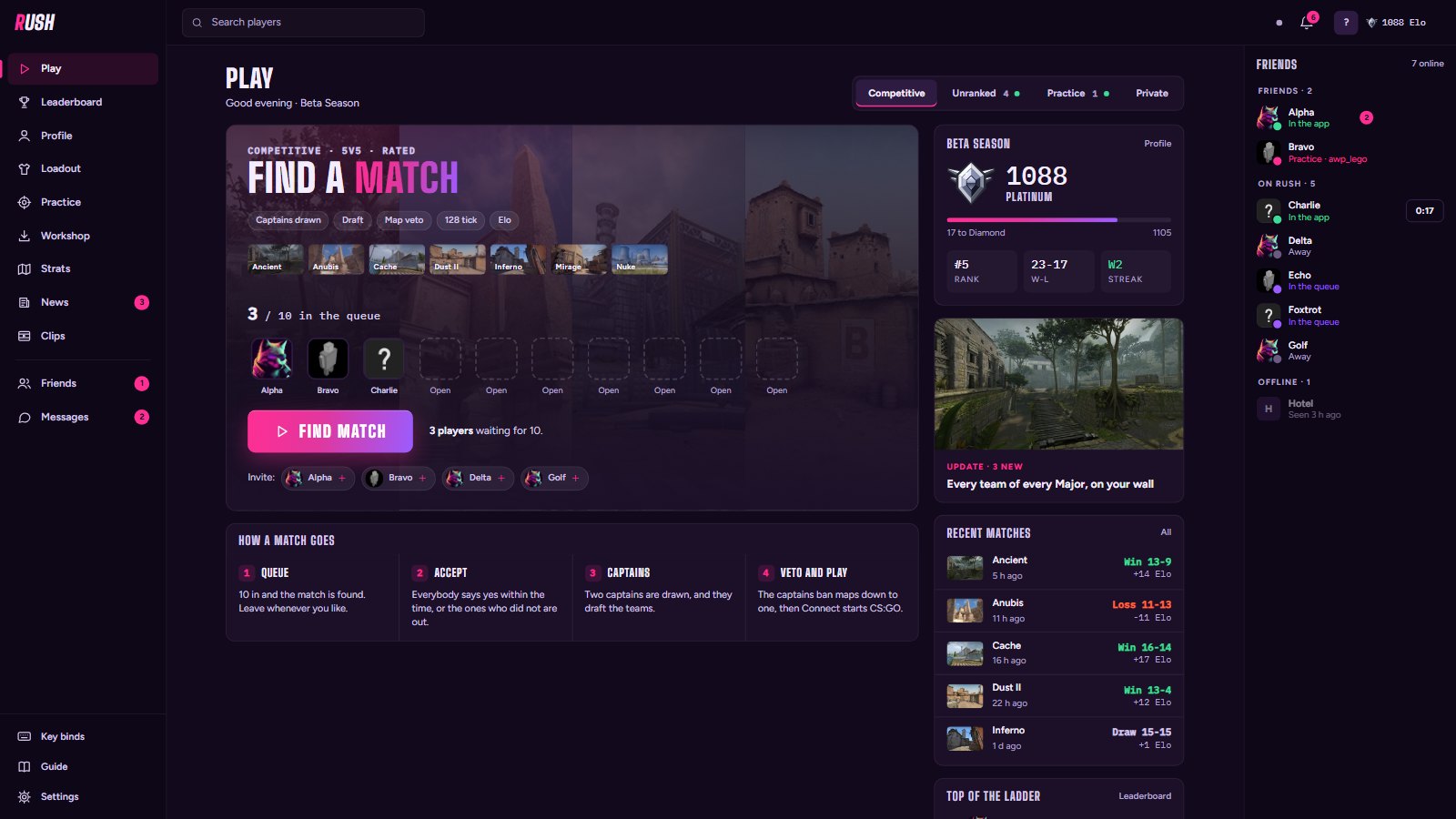
The Rush app's Play page: the side bar of places, the competitive queue, Unranked and Practice, and friends down the right
PlayThe competitive queue with who is in it, Unranked and Practice with who is on them, your season and your last matches — the places down the left, your friends down the right.

A match, start to finish

Queue, draft, veto, play

Nobody has to organise it. The lobby moves itself along, and every pick has a clock.

The Queue screen
QueueFind match on Play. Everybody waiting is on screen, the queue sits in the top bar wherever you go, and it fills while the window is shut.
The Match found screen
Match foundIt comes up over whatever you are on - ten faces and a clock. Accept, and the match room opens.
The Captains screen
CaptainsEverybody names two players, and the two named most are the captains. You cannot name yourself.
The Draft screen
DraftThe captains pick their teams one player at a time - against the clock, in a snake: 1, 2, 2, 1.
The Veto screen
VetoThe pool is banned down in rounds until one map is left. Already in the game? The same veto is an in-game menu.
The Play screen
PlayOne button starts CS:GO and puts you on the server. The teams, the odds and the match chat stay on screen.
The After screen
AfterBack in the app, the match plays back: your rating counting up, a tier promotion, the ladder - and the story of the match.

With your friends

Ask them in, write to them, or keep it private

The Friends screen
FriendsWho is on Rush and on the servers, your friends and their requests, and anybody by name. Invite somebody and you are both in the queue - they get thirty seconds to say yes.
The Messages screen
MessagesWrite to a friend: emoji, replies, reactions, "typing..." and Seen. A message reaches them in the game too, and the lobby and the match have a chat of their own.
The Private lobby screen
Private lobbyA queue of its own behind a code, or a link that opens the app. Only people who have it can join.

Between matches

Everything else is in there too

The Loadout screen
LoadoutAgents, music kit - CS2's too - graffiti, knife, gloves, stickers and a skin for every gun. Picked here, on you at your next spawn - and inside the music kit, each moment of a round can have its own kit and volume.
The Practice screen
PracticeA server of its own with cheats on: trajectories, infinite nades, any map - AWP mode and the 1v1 Arena included.
The Workshop screen
WorkshopAim Botz, the recoil and reflex trainers, all eleven YPRAC map guides and Valorant's maps - put into your own CS:GO, to play offline.
The Key binds screen
Key bindsPut !sell, the skins and graffiti menus, buys and the jump-throw on any key. Press the key, Save, and the app writes it into your CS:GO.
The Unranked screen
UnrankedWhat the casual server is playing, its four modes - Unrated, Wingman, Retakes and Valo, the Valorant maps - and every map and setting of each.
The Strat board screen
Strat boardDraw the round on the map's own radar, step by step - yours or for everybody - and copy the Rush library's plays for every map.
The News screen
NewsEvery 5v5 written up as it ends, yesterday in Rush, the week every Monday and what is new - here on the website too.

On your PC

What it does, and what it does not

  • Tells you when it is time

    It lives in the tray and pops a notification the moment the queue fills or somebody invites you - even with every window closed.

  • One click into the game

    It starts CS:GO through Steam and connects you to the right server. Nothing to type.

  • Mouse first, keys too

    Click anything. Enter accepts a match, Esc goes back, / searches and M mutes. It opens in a window - F11 for full screen.

  • Keeps itself current

    Updates come from our own server in the background, then it restarts itself. You never reinstall.

  • Installs for you alone

    No administrator rights, nothing outside your own user profile. Uninstall it like any other app.

  • Stays out of the game

    No overlay, nothing injected into CS:GO: it launches the game the way Steam does, and in-game menus come from the server.

Questions

Before you install

Who can play?

Anybody can sign in and download. To play ranked 5v5 an admin has to let you in first - sign in with Steam, then ask on our Discord. Unranked and practice are open to everyone.

Which CS:GO does it start?

The legacy build of CS:GO, from your Steam library. Rush does not run on CS2.

What does it need?

Windows 10 or 11, Steam, and CS:GO (legacy) installed. The installer is 106.7 MB.

Why sign in to download?

The app is for the people who play here, so it asks who you are first. Signing in is with Steam: we get your SteamID, never your password.

What does it know about me?

Your SteamID, name and avatar from Steam, your matches and stats, and when you have the app open. The privacy policy has the whole list.

More in the privacy policy and about Rush.

Get it, sign in once, and you are in the queue.